
Rotary encoder HMI panel integration succeeds when the OEM defines knob behavior, the encoder supplier defines device limits, and the front-panel integrator owns the released mounting, sealing, interconnect, and inspection work within its supply scope. For a 24-pulse-per-revolution (PPR), 24-detent menu knob, a useful prototype target is one displayed change per detent, with zero missed or extra changes over 100 clockwise and 100 counterclockwise detents on a mounted sample.
Treat the knob as one concentrated mechanical load and one pulse-generating input beside the display. A correct pinout does not prove mounted operation.
Start with the operator action and the mounting boundary
The decision starts with what one rotation and one press should do. A detent is the physical click felt by the operator; a pulse is an electrical event defined by the selected encoder. They are not interchangeable units. The HMI application may intentionally turn several raw transitions into one menu step, accelerate coarse movement, or ignore a press while the control is disabled.
Write the intended actions before purchasing parts:
- Turn clockwise or counterclockwise: specify which on-screen value changes, its direction, step size, end stops, and whether acceleration is permitted.
- Push the shaft, if fitted: assign a confirm, enter, or select action; specify whether a press can also alter the highlighted value.
- Operate touch and knob together: state which input has focus and what happens if the operator touches the display while turning.
- Restart or reconnect: state the initial selection, enabled state, and response to an unplugged or noisy input.
Menu navigation is not a safety function. Emergency stops and protective interlocks remain in the OEM's approved architecture.
For an enclosure-mounted front, identify the exact supply edge: visible knob and front surface, bezel or carrier, display, encoder, PCB, harness, connector, seal, and fasteners. A supplied part, an installed part, and an electrically tested part are three different deliverable states.
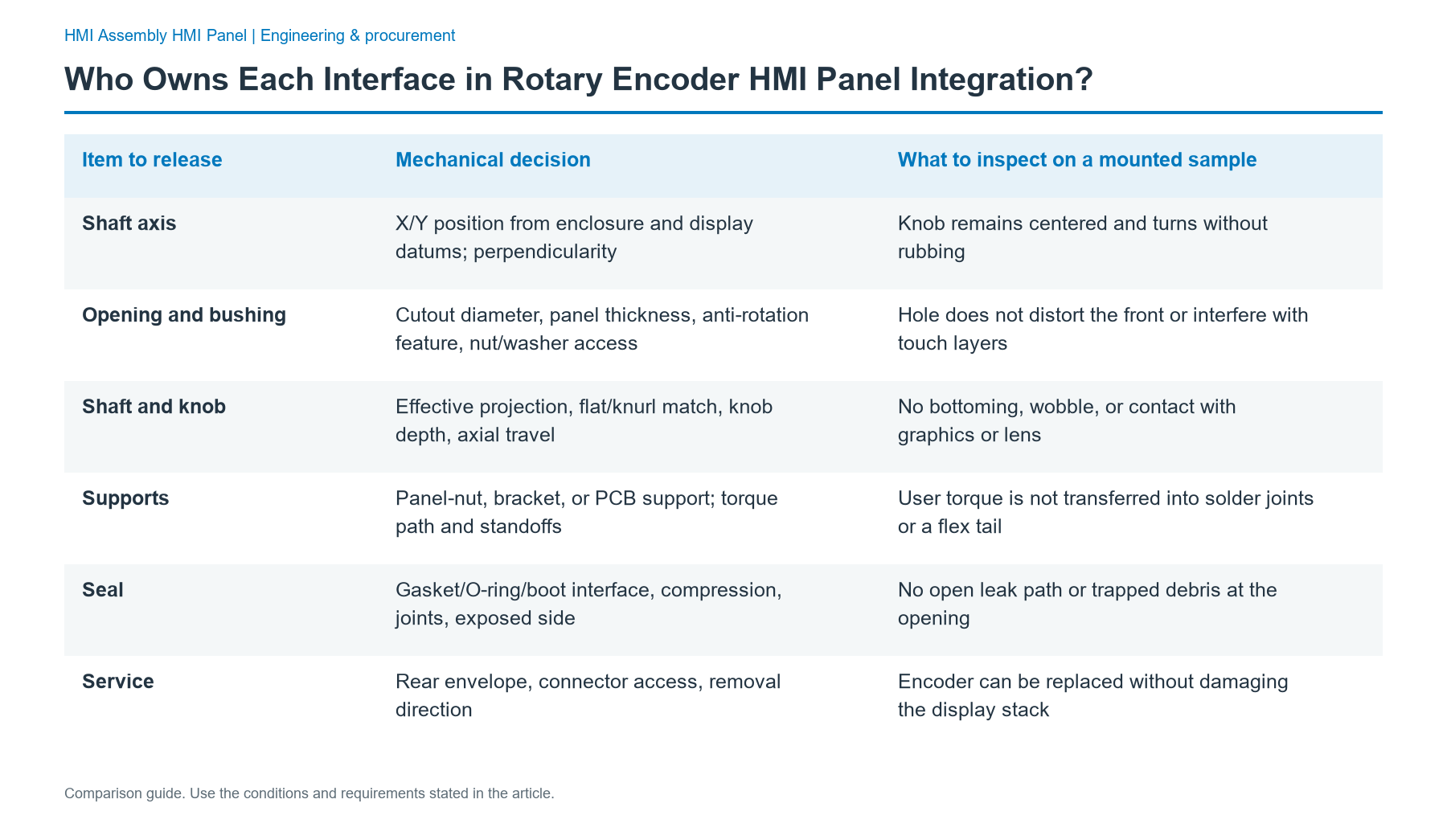
Give the mechanical interface a complete shaft-and-panel drawing
The hmi rotary control mounting interface needs a datum chain from the finished front surface to the encoder's mounting face, shaft center, knob, and circuit or bracket. The shaft must be operable after the production gasket is compressed and after the host enclosure is tightened.
| Item to release | Mechanical decision | What to inspect on a mounted sample |
|---|---|---|
| Shaft axis | X/Y position from enclosure and display datums; perpendicularity | Knob remains centered and turns without rubbing |
| Opening and bushing | Cutout diameter, panel thickness, anti-rotation feature, nut/washer access | Hole does not distort the front or interfere with touch layers |
| Shaft and knob | Effective projection, flat/knurl match, knob depth, axial travel | No bottoming, wobble, or contact with graphics or lens |
| Supports | Panel-nut, bracket, or PCB support; torque path and standoffs | User torque is not transferred into solder joints or a flex tail |
| Seal | Gasket/O-ring/boot interface, compression, joints, exposed side | No open leak path or trapped debris at the opening |
| Service | Rear envelope, connector access, removal direction | Encoder can be replaced without damaging the display stack |
An encoder mounted only by PCB pins may work electrically but leave the board carrying the knob's radial and torsional loads. Where operator loads are significant, use an approved panel bushing or dedicated support and inspect PCB strain. Do not assume a panel nut, board bracket, or adhesive automatically supplies environmental sealing.
Stack-up calculation: define shaft projection as the selected component's usable shaft length minus all dimensions that consume that length between its stated mounting datum and the knob engagement datum. Evaluate the worst-case short and long stacks, including panel thickness, washers, compressed seals, knob recess, and axial push travel. Do not subtract nominal dimensions from different drawing datums or treat shaft overall length as exposed length.
Keep the encoder cutout and fastener pressure away from the active touch-sensor area and display bonds. A rigid glass cover is not a suitable default drilling substrate. If the mechanical concept places a rotary axis through the cover, the lens, backing, print, seal, and tooling require a separately released construction rather than a field modification.
Define the electrical interface as signals, not just wires
For a contact-type incremental quadrature encoder, A and B are the phase outputs and C is their common return in a typical three-terminal circuit. An optional momentary push switch has a separate contact pair. The drawing must identify the actual device terminals; the labels and pin order are not standardized across every series.
Record input voltage, contact rating or output logic type, pull-up arrangement, filter, connector assignment, return path, and maximum intended turn speed. Contact outputs need suitable conditioning and debouncing. An active electronic encoder may instead require a supply and has different output-stage rules. Never apply a 5 V example circuit to a 3.3 V-only controller without checking electrical compatibility.
| Signal/interface | Responsibility to assign | Electrical proof |
|---|---|---|
| A and B | Encoder data sheet defines phase behavior; PCB/host owner defines compatible inputs | Capture both phases while turning each direction |
| Common / return | Circuit owner defines reference and current path | Confirm polarity, continuity, and reference under load |
| Push switch, if selected | Device supplier specifies contacts; application owner maps action | Confirm press/release without unintended rotary changes |
| Input conditioning | Electronics/firmware owner selects pull-ups, filtering, decoding | No illegal state transitions or missed valid events at required speed |
| Harness and connector | Front-panel scope defines cable/connector; OEM defines mate | Pin-to-pin check, strain-relieved installed routing |
| Chassis and ESD | OEM defines equipment bond; integrator defines physical path in supplied module | Mounted equipment test using the specified ESD plan |
The input decoder should accept the valid Gray-code transitions of the two phases and flag or reject impossible two-bit jumps rather than interpreting every bounce as intentional rotation. Direction must be tested from the operator's front view, because reversing the shaft perspective, swapping A/B, or changing application settings can invert it.
PPR is also not the number of screen steps. With standard x1, x2, or x4 quadrature decoding, a 24 PPR encoder can expose 24, 48, or 96 raw counts per revolution, respectively, under the chosen counting convention. A 24-detent knob still feels like 24 clicks per revolution. To obtain one menu step per detent, the application owner must normalize and validate those counts against the actual detent positions and phase timing. A 24 PPR/24-detent label alone does not prove that mapping.
At an illustrative test speed of 30 revolutions per minute (rpm), 24 PPR produces 12 A-channel pulse cycles per second and up to 48 ideal state transitions per second with x4 decoding. This is a sizing illustration, not a measured contact-bounce rate; the selected controller must tolerate actual bounce, interrupt latency, and display update load. Set filter timing from the selected encoder's data and the mounted waveform, not from a copied debounce delay.
Select real discrete encoder options without mixing incompatible codes
A useful comparison is between contact-type incremental, noncontact incremental, and application-specific encoded rotary inputs. Contact types are straightforward for low-cost menu knobs but require bounce management; optical or magnetic designs add powered electronics and their own voltage, mounting, and environmental requirements. Compare the specific approved device, not a generic claim of superior durability.
The PEC11R family provides a concrete example of how a catalog's discrete options restrict one another. Its published ordering set is specific to that family, not a universal menu for all encoders.
| Catalog dimension | Complete published options in this family | Selection rule |
|---|---|---|
| Resolution | 12, 18, 24 PPR | Match interface bandwidth and intended UI step mapping |
| Mechanical detents | 0, 12, 18, 24 detents/revolution | Choose physical feel independently of decoding multiplier |
| Shaft length | 15, 20, 25, 30 mm | Check finished-panel projection and knob engagement |
| Terminal orientation codes | 1, 2, 4 | 1 = vertical/side-facing 7 mm; 2 = vertical/side-facing 10 mm; 4 = horizontal/rear-facing |
| Shaft style codes | F, K | F = flatted metal; K = knurled metal, with length restrictions |
| Push-switch codes | N, S | N = no switch; S = momentary push switch |
The allowable detent/PPR pairs in this ordering table must be preserved rather than extrapolated: 0 detents with 12, 18, or 24 PPR; 12 detents with 12 or 24 PPR; 18 detents with 18 PPR; and 24 detents with 12 or 24 PPR. Knurled-shaft versions have further switch/length restrictions: without a switch, 15, 20, 30 mm are listed; with a push switch, 15, 20 mm are listed. A 25 mm knurled option must not be inferred from the shaft-length list.
For the worked touchscreen-and-knob menu example, specify 24 PPR with 24 detents, then resolve the shaft, mount, and switch as a complete approved part number. If a press-to-select function is mandatory, choose a documented switch-equipped configuration and test axial motion against the installed knob and gasket. An 18-detent design with 18 PPR may fit a different feel; higher PPR is not automatically better.
Different catalogs demonstrate why the family boundary matters: the EC11E family has published combinations of 9 PPR/18 detents, 15 PPR/30 detents, and 18 PPR/36 detents; a 62S optical family lists 8, 12, 16, 20, 24, and 32 PPR. These are separate series-specific lists, not extra choices to merge into the PEC11R order code. Verify availability, interface type, shaft geometry, mounting, and product lifecycle for the exact selected code.
Treat the encoder opening as a sealing and touch-design change
A touchscreen and encoder operator panel needs two independent questions answered: can the encoder component tolerate its environment, and can the installed front and host enclosure meet the equipment ingress objective? They are not the same claim. For example, the referenced PEC11R family lists IP40 for its component. That rating cannot be relabeled as water-sealed simply because a gasket was added nearby.
Use IEC 60529 to define the intended enclosure IP test conditions and boundary. A target such as IP65, if the OEM selects it for an exposed machine front, requires a compatible shaft seal, lens-to-bezel seal, fasteners, cable exit, cabinet surface, and repeatable installed compression. The number is an OEM project target, not a JASPER product certification or a component claim. If the selected encoder lacks a suitable shaft seal, either redesign the protected volume or choose an encoder with a documented environmental interface.
Cleaning fluid can wick along the shaft or pool against a raised knob. Test orientation, dwell, wipe direction, chemical compatibility, and post-cleaning knob behavior. A protective boot or front seal may improve the leak path but alter the feel, travel, or long-term serviceability; verify both the mechanical and electrical results after the seal is installed.
Electrical interaction also changes near a capacitive display. Route A/B wiring away from noisy display, backlight, and high-current paths as the layout permits; define shielding and chassis bonding at the equipment boundary. Qualify the assembled control against the OEM's ESD and EMC plan. IEC 61000-4-2:2025 describes an ESD immunity test method, not a universal discharge level to assert without a product requirement.
Assign ownership before releasing the encoder to procurement
A rotary control often crosses four organizations: the machine OEM, the encoder vendor, the HMI assembly supplier, and the electronics/firmware owner. Put one accountable sign-off against every row, even if one company fills multiple roles. A blank responsibility cell typically becomes a late prototype dispute.
| Interface or evidence | Lead owner | Support and release boundary |
|---|---|---|
| Operator action, direction, step size, focus behavior | OEM HMI application owner | Approves one-click semantics and disabled states |
| Encoder order code, rated limits, terminals, shaft drawing | Selected encoder supplier / purchasing owner | Exact series data and approved substitutions |
| Front artwork, cutout, carrier, knob clearance, mounting | HMI front-panel integrator within agreed scope | Releases stack drawing and mounted fit sample |
| Seal design at supplied module | Front-panel integrator within agreed scope | OEM supplies mating enclosure and sets final ingress target |
| PCB input conditioning and internal harness | Named electronics/harness owner | Schematic, pinout, filter parameters, fixture evidence |
| Application decoding and on-screen feedback | OEM software owner | Releases firmware configuration and UI acceptance behavior |
| Cabinet bonding, final EMC, safety functions | Machine OEM / systems owner | Defines finished-equipment test severities and criteria |
| Incoming inspection and first-article evidence | Supplier quality and OEM approver | Controls revision, traceability, deviations, and sign-off |
JASPER's relevant scope is the physical and electrical front-module handoff—bezel or carrier, display/input relationship, seals, fasteners, rear assembly, and agreed connector and checks—not an assumption that JASPER manufactures the selected encoder or owns PLC logic. The front panel HMI assemblies route is suitable when the released deliverable is an enclosure-mounted operator front. If the project also has a separate PLC data link, the PLC and HMI hardware interface guide addresses that wider boundary.
Release the design through six test gates
Use the following flow from the first drawing review to a production-intent sample. Each gate has an input, observation, decision, and documented output; none is replaced by a supplier's component specification alone.
| Gate | Input and practical check | Pass decision and output |
|---|---|---|
| 1. Intent | Menu map, direction, knob press, touch-focus states | One signed operator-action matrix and UI acceptance script |
| 2. Device | Full part code, voltage/contact type, PPR, detents, shaft drawing | Approved BOM item and electrical pin map |
| 3. Fit | Enclosure CAD, panel stack, gasket compression, rear space | Mounted sample turns and presses freely; signed mechanical drawing |
| 4. Signals | Scope or logic-analyzer capture at PCB/connector; both directions | Valid A/B sequence, appropriate levels, no unexplained transitions; waveform record |
| 5. Interaction | Production-intent firmware, touch active, display illuminated | Specified click-to-step behavior with no touch or press conflict; test log |
| 6. Environment | Mounted enclosure, cleaning, vibration, ESD/ingress test plans | No functional or ingress failure under specified conditions; OEM evidence and release |
Gate 3 failures send the team back to shaft datums and mounting loads; gate 4 failures to electrical capture; gate 5 failures with clean signals to decoder and UI mapping.
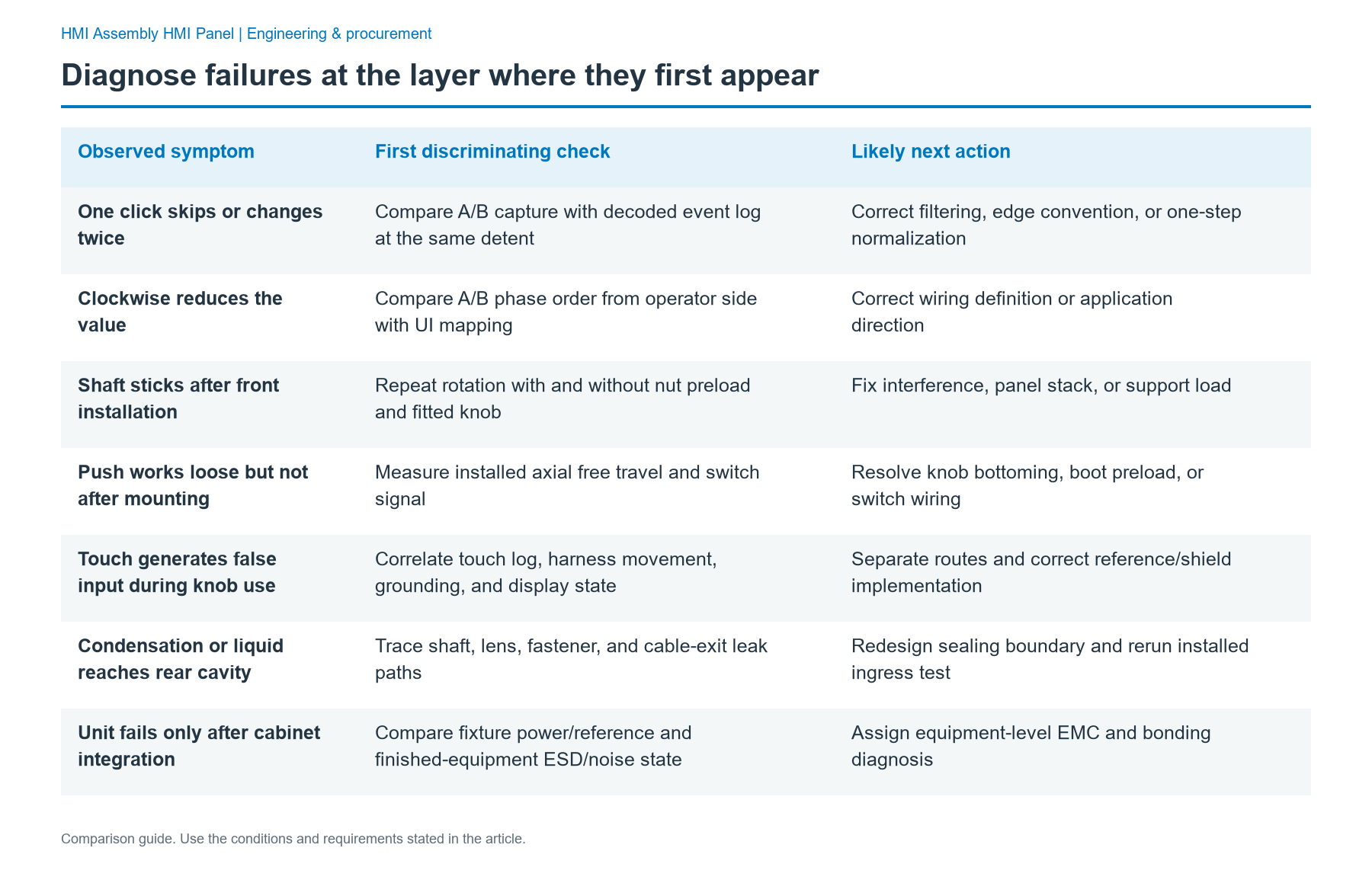
Diagnose failures at the layer where they first appear
| Observed symptom | First discriminating check | Likely next action |
|---|---|---|
| One click skips or changes twice | Compare A/B capture with decoded event log at the same detent | Correct filtering, edge convention, or one-step normalization |
| Clockwise reduces the value | Compare A/B phase order from operator side with UI mapping | Correct wiring definition or application direction |
| Shaft sticks after front installation | Repeat rotation with and without nut preload and fitted knob | Fix interference, panel stack, or support load |
| Push works loose but not after mounting | Measure installed axial free travel and switch signal | Resolve knob bottoming, boot preload, or switch wiring |
| Touch generates false input during knob use | Correlate touch log, harness movement, grounding, and display state | Separate routes and correct reference/shield implementation |
| Condensation or liquid reaches rear cavity | Trace shaft, lens, fastener, and cable-exit leak paths | Redesign sealing boundary and rerun installed ingress test |
| Unit fails only after cabinet integration | Compare fixture power/reference and finished-equipment ESD/noise state | Assign equipment-level EMC and bonding diagnosis |
A good outgoing continuity check cannot prove installed cable routing or the shaft seal. Record the test state and owner.
Use an acceptance record that separates specification from results
The following illustrative prototype acceptance plan is for the selected 24 PPR/24-detent contact-encoder concept, a menu function, and an equipment project whose maximum required manual speed is 30 rpm. These are proposed project criteria, not completed tests, standard-mandated limits, or blanket equipment claims. Change them when the actual operating specification requires it.
| Record field | Method and mounted state | Proposed acceptance criterion |
|---|---|---|
| Configuration | Log exact part number, BOM revision, board/firmware version, cutout drawing | Complete revision match with approved drawing package |
| Knob access | Turn, press, and release with gasket, cover, and enclosure fully fastened | No interference, binding, or switch held active |
| Rotation response | At up to 30 rpm, execute 100 individual detents CW, then 100 CCW; record input and UI output | 100 correct changes each direction; 0 misses, 0 extras |
| Direction and endpoint | Sweep menu both ways and through permitted end values | Front-view CW/CCW behavior and limits match signed UI map |
| Push select | Perform 100 distinct press/release actions with encoder mounted | Exactly 100 intended actions; no accidental change from rotation |
| Electrical capture | Record A/B, common and optional switch at host input, with display running | Decoding stable within selected component logic limits; no invalid accepted jump |
| Touch coexistence | Use the approved touch gestures while turning and pressing | Only the defined control receives the action; no ghost command |
| Seal and EMC | Test complete installed assembly under the OEM's specified procedures | Meets written pass/fail criteria; report severity and configuration |
| Handoff | Compare pin map, harness strain relief, identification, packaging, replacement access | Signed sample, inspection evidence, and installation instruction |
Record sample ID, date, ambient, speed, directional results, waveform ID, firmware/enclosure revisions, inspector, and retest status. The proposed 100-click check is not a lifetime rating; life qualification needs a separate duty-profile test.
Send one interface package to the HMI assembly team
A manufacturable handoff combines the operator drawing with a real encoder code, not a request for a generic rotary control. Include the enclosure opening and datums, assembly stack, knob and shaft limits, gasket and mounting hardware, the display/touch keep-out, rear depth, connector and harness, A/B and switch pin map, power/logic requirements, grounding and shielding, operating environment, and the approved acceptance matrix. Name the encoder sourcing owner separately from the front-module integrator.
For the commercial and sample discussion, add the BOM, projected annual quantity, prototype quantity, project milestones, tool and sample approval schedule, and which organization owns each test. A mounted drawing review can then identify what JASPER can integrate within the released HMI front and which work remains with the component source or machine OEM.
Frequently Asked Questions
Who owns the shaft hole in a rotary encoder HMI panel integration project?
The front-panel mechanical owner should control the hole, locating datums, bushing interface, nut access, and tolerance stack for the supplied assembly. The encoder supplier defines its shaft and mounting geometry, while the machine OEM supplies the mating enclosure and installation conditions. If a different organization drills the final opening, that handoff belongs in the released drawing.
Does 24 PPR mean 24 on-screen steps per revolution?
Not automatically. A 24 PPR encoder may produce 24, 48, or 96 raw quadrature counts per revolution with x1, x2, or x4 decoding. Detents are a separate physical characteristic. The HMI software owner should define one operator step and then verify the actual detent-to-display relationship on the mounted unit in both directions.
Can an encoder with an IP40 rating make an HMI panel IP65?
No. IP40 is a component-level specification for the referenced encoder family, whereas IP65 would be an enclosure ingress objective selected by the OEM. The shaft passage, gasket, cover, fasteners, housing surface, and cable exit must form a qualified installed boundary. Use the applicable IEC 60529 test plan for the complete configuration rather than inheriting a component rating.
Should the encoder mount to the PCB or directly to the front panel?
Choose the support path from expected user loads and the selected component's mounting requirements. PCB terminals alone may leave solder joints exposed to knob forces. A panel bushing or separate bracket can transfer load to structure, but must still respect torque limits, shaft alignment, seal compression, and PCB clearances. Validate the fully fastened production-intent sample.
Who should provide pull-ups and debounce for an A/B encoder?
The electronics owner should specify the input circuit, and the firmware owner should define the decoding and filtering behavior. The selected encoder's contact or active-output specification determines permissible voltages and currents. Capture both channels at the host input while operating the display and knob, then check that the final software reports only the intended steps.
Can a push-to-select encoder replace a safety stop button?
No. A normal encoder push switch is an operator command input, not an automatically safety-rated stopping device. The OEM's machine risk assessment and approved safety-control architecture govern safety-related actions. Within the HMI assembly, specify the switch contact interface and UI response without claiming that its presence qualifies a protective function.
What drawings and tests are needed before asking for a production quote?
Send the front and enclosure drawings, stack tolerances, exact encoder code, knob geometry, bill of materials, pinout, harness and connector, mounting and sealing scheme, sample scope, annual volume, and project dates. Include the responsibility matrix and proposed fit, signal, one-step-per-detent, touch coexistence, and environmental checks so the quote reflects a defined deliverable rather than an undefined integration task.
Put the encoder into the drawing review
If the next decision is whether the encoder, display, and front surface can be delivered as one mounted module, Send Drawing with the assembly drawing, BOM, shaft and panel interface, electrical pin map, supply-responsibility table, prototype and test scope, annual demand, and project milestones. The goal is an approved physical/electrical handoff, not an assumed encoder manufacturing or machine-control contract.
Bring the drawing, stack and operating conditions
JASPER engineering will review the interfaces, open risks and evidence required for a production quote.